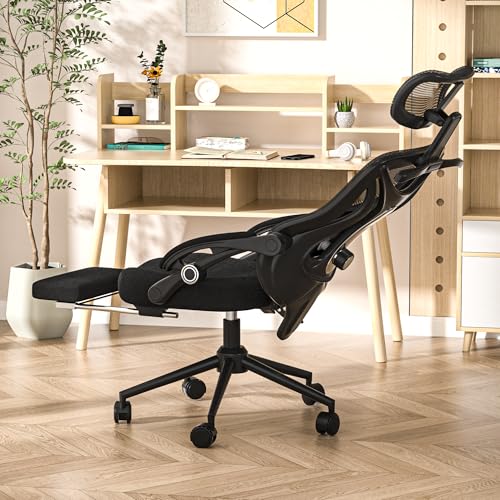

Tight gaming setups often turn a fun session into a frustrating reach for the keyboard. Elbows float, wrists bend, and the whole station starts feeling like a compromise. That’s where the right tray can change everything, pulling controls closer and cutting down on awkward posture. After reviewing the specifications and user feedback, we’ve rounded up the top options that balance ergonomics, durability, and space control. Whether you need a chair-mounted platform or a swivel table, these picks aim to make long hours feel more natural. For more on seating foundations, check out our Best Gaming Chair Under 200 2026 Top Picks.
The Best Gaming Chair With Keyboard Tray category isn’t just about flashy seats; it’s about how the whole setup behaves minute by minute. A well-chosen tray or mount can save desk space, improve wrist alignment, and reduce the clutter that breaks concentration. Based on product descriptions and key features, each entry here focuses on adjustability, stable support, and real-world usability. From VIVO’s chair-mounted trays to the Stander Wonder Tray’s oversized surface, these solutions address common frustrations like cramped workspaces and poor tool organization. For a deeper dive into ergonomic seating, see our Best ergonomic folding office chair 2026 picks.

Pros
- Frees up desk space by attaching to the chair
- Fully adjustable tilt and rotation for personalized comfort
- Large surface accommodates full-size keyboards and mouse
- Sturdy steel arm provides stable support during use
- Simple installation with no desk modification required
Cons
- Only compatible with chair tubes of specific diameter (1.7 to 2 inches)
- May add weight to the chair, affecting mobility
- Requires some assembly and adjustment to get the perfect position
The VIVO Office Chair Mounted Keyboard and Mouse Tray (MOUNT-KB08C) is a practical solution for anyone looking to reclaim desk space while maintaining an ergonomic workstation. This innovative accessory attaches directly to the bottom tube section of a standard height-adjustable office chair, allowing you to position your keyboard and mouse exactly where you need them. It is particularly well-suited for home office users, gamers, college students, and small-space dwellers who want to maximize their work area without sacrificing comfort.
In terms of real-world performance, the tray offers a generous 26 x 12 inch surface that comfortably fits most standard and oversized keyboards along with a mouse. The ability to tilt and rotate the platform 360 degrees means you can find the ideal angle for typing, reducing strain on your wrists and shoulders. This flexibility is a major plus for long work sessions or gaming marathons. The raised side edges add a layer of security, preventing your equipment from sliding off during use.
Build quality is solid, with a steel arm that clamps securely to the chair's tube. The tray itself feels sturdy and well-constructed, capable of supporting the weight of a full keyboard and mouse without wobbling. The black finish is professional and blends well with most office chairs. While the product does not specify a weight capacity, the robust design suggests it can handle typical desktop peripherals with ease.
Setup is straightforward, though it does require some initial assembly and adjustment to get the tray positioned at the right height and angle. The clamp mechanism is easy to tighten, and once in place, the tray stays put during normal use. Cleaning is simple - a quick wipe with a damp cloth keeps the surface looking new. One limitation to note is that the clamp is designed for chair tubes with a diameter between 1.7 and 2 inches, so it may not fit all office chairs. Additionally, the added weight of the tray can make the chair slightly less mobile, which might be a consideration for those who frequently move around their workspace.
Overall, the VIVO MOUNT-KB08C is a smart investment for anyone who wants to improve their ergonomic setup without taking up desk space. It is especially useful for home office users, apartment renters with limited desk area, and gamers who need a clean, organized workstation. While it may not be suitable for every chair, for those with compatible models, it offers a practical and comfortable typing solution.

Pros
- Transforms any chair into a mobile workstation, perfect for small spaces and multitasking
- Adjustable positioning helps maintain a healthy, ergonomic posture for long hours
- Mouse pad attachment on armrest adds extra convenience without extra desk space
- Compatible with a wide range of chair types due to large clamp range
- Solid silver metal construction feels durable and stable during use
Cons
- Requires a chair with a round gas cylinder or bar under the seat; not compatible with square or shaped posts
- May not hold very heavy gaming laptops or large tablet setups securely
- Installation may take a few minutes of adjustment to get the perfect fit and angle
The MagicHold Computer Keyboard Stand Laptop Mouse Mount is a clever space-saving solution designed for anyone who spends long hours at a desk - whether you are a remote worker, a passionate gamer, or a college student in a cramped dorm. This mount attaches directly to the gas cylinder or any round bar on your chair (up to 1.96 inches diagonal thickness) and holds your laptop, keyboard, and mouse in an ergonomic position. It effectively turns your seating into a complete workstation, freeing up valuable desk real estate for papers, coffee, or just extra elbow room.
This product is best suited for U.S. homeowners with home offices, apartment renters who lack desk space, families with shared workstations, and college students who need a flexible study setup. It is also a great pick for Airbnb hosts who want to provide a versatile work area for guests without permanent furniture. The mount allows users to work or game from a comfortable chair without hunching over a low desk, which can significantly reduce back and neck strain over time.
In terms of real-world performance, the MagicHold mount provides a stable platform for laptops, tablets (like iPads), and standard keyboards. The clamp mechanism grips the chair column securely, and once tightened, it holds the tray steady during typing or mouse movement. The included mouse pad tray attaches to the armrest, keeping your mouse within easy reach. For users who switch between sitting back to watch a movie and leaning forward to work, the arm can be adjusted to different angles and heights, offering flexibility throughout the day.
Build quality is solid. The mount is made from silver metal with a clean, modern look that blends with most office chairs. The clamp is padded to protect your chair's cylinder from scratches. The tray itself has a smooth surface that is easy to clean with a damp cloth. While the product is not made of wood or upholstered, its metal construction feels durable enough for daily use. There are no shelves or hidden storage - the focus is purely on creating an ergonomic workstation that saves desk space.
Assembly is straightforward but may require some trial and error to find the perfect position. The clamp opens wide enough to fit most standard chair columns, but chairs with square or irregularly shaped posts will not work. Also, because this mount is designed for a single chair, it is not a standalone desk - it relies entirely on the chair's stability. For those with heavy gaming laptops or multiple monitors, the weight capacity is limited; it works best with a single laptop or lightweight keyboard.
Overall, the MagicHold mount is a practical investment for anyone seeking to improve their posture and reclaim desk space. It works well in home offices, small apartments, dorm rooms, and rental properties where every square inch counts. If you already have a comfortable chair and just need to elevate your keyboard and screen, this mount offers a simple, affordable solution. It is not a replacement for a full desk setup, but for focused work or gaming sessions, it is a smart addition to any small-space workstation.
Pros
- Highly adjustable angles and rotation let you find the perfect ergonomic position.
- Frees up desk space by mounting directly to your chair or bar, ideal for small spaces.
- Sturdy steel construction with 20KG weight capacity ensures durability and stability.
- Includes a wrist rest and mouse pad for added comfort during extended use.
- Easy to install and compatible with most chair arms or round bars.
Cons
- Requires a chair with a suitable round bar or armrest for mounting; not all chairs are compatible.
- The green color may not match all office or home decor styles.
- Assembly may take some time to adjust all the angles and secure the mount properly.
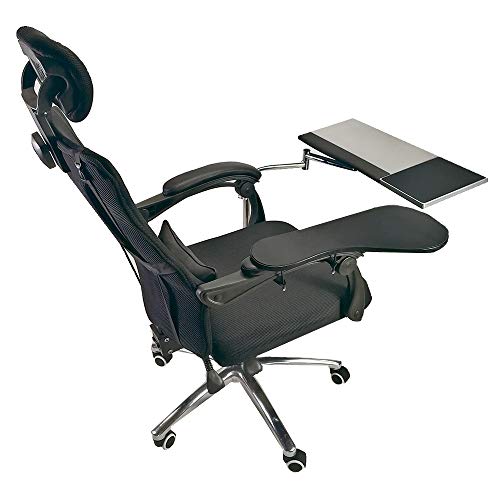
The Noble Createaprototype Laptop Mouse Stand Mount Workstation is a unique ergonomic accessory designed to transform your chair or round bar into a fully functional workstation. It combines a keyboard tray, mouse pad, and wrist rest into one adjustable unit that mounts directly to your seating, making it a practical solution for home office users, gamers, college students, and anyone working in tight spaces like apartments or small rooms.
This workstation shines in its adjustability. The keyboard tray rotates 360 degrees and tilts forward up to 85 degrees, backward up to 20 degrees, and side to side 45 degrees each way. This range lets you position your keyboard and mouse at the most comfortable angle for your posture, reducing strain on your wrists, shoulders, and neck. The built-in wrist rest and mouse pad are shaped to support your arm and promote healthy blood circulation, which is a big plus for long typing or gaming sessions.
Build quality is a focus here. The stainless steel pipe has a diameter of 25mm and a thickness of 1.6mm, which the manufacturer claims is equivalent to five times the strength of standard anti-theft door materials. With a load capacity of 20KG, it can handle a laptop, keyboard, mouse, and other small accessories without wobbling. The fall prevention design includes a negative tilt bracket that folds to keep your keyboard from slipping off, adding security during use.
For space-saving, this mount is a game-changer for small desks or cluttered workstations. By attaching to your chair or a round bar, it frees up valuable desktop real estate. This makes it especially useful for apartment dwellers, dorm rooms, or shared offices where every inch counts. The included cable bayonet helps keep cords organized, reducing mess.
Setup is straightforward but requires some patience to adjust all the angles to your liking. The package includes the laptop desk holder, square mouse plate, and clamp mouse plate. Note that the chair is not included, so you'll need a chair with a compatible round bar or armrest. The green color may not appeal to everyone, but it adds a pop of color to a neutral workspace.
Overall, this workstation is a practical investment for anyone seeking an ergonomic, space-saving solution for their home office or gaming setup. It's best suited for users who prioritize comfort and adjustability over traditional desk-mounted trays. While it has limitations in color and chair compatibility, its sturdy build and versatile adjustments make it a solid choice for improving your daily work or play experience.
Pros
- Large surface area comfortably accommodates a laptop, meal plate, and accessories
- Swivel function adds flexibility for multitasking without repositioning the base
- Sturdy support up to 20 pounds, suitable for laptops, tablets, and light dining
- Height and depth adjustments offer a personalized fit for different chair sizes and user preferences
Cons
- Not designed for freestanding use or on beds, limiting placement to chairs with armrests
- Requires measuring chair depth before purchase to ensure proper fit of the base
- Weight of 20 pounds may make it less portable for frequent moving between rooms
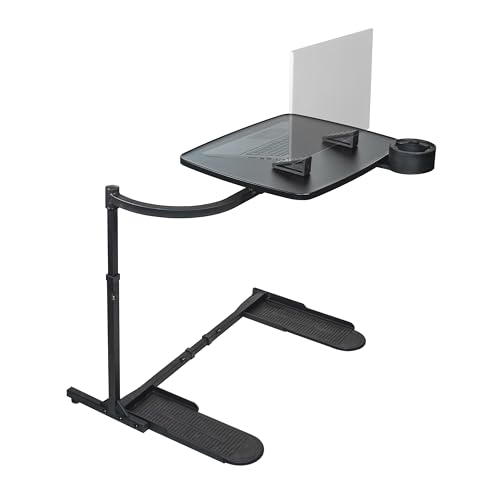
The Stander Wonder Tray is a versatile oversized lap desk and couch table designed to bring convenience to your seated activities. Measuring 23.5 by 15 inches, the extra-large surface provides plenty of room for a laptop, dinner plate, or gaming setup. The tray swivels 360 degrees, allowing you to pivot it for different tasks without shifting the entire unit. With an adjustable height range of 20 to 30 inches and base depth that extends from 20 to 32 inches, this table can be tailored to fit most chairs, recliners, and lift chairs.
This product is especially suited for U.S. homeowners, apartment renters, remote workers, gamers, college students, and seniors who spend extended time seated. Whether you are eating dinner in front of the TV, working on a laptop from your recliner, or enjoying a gaming session, the Wonder Tray aims to keep your essentials within easy reach. The included cup holder and two laptop wedges add to its practicality, letting you stabilize drinks and adjust your typing angle for better ergonomics.
Real-world performance is centered on stability and convenience. The wraparound curved arm secures the tray around your chair's armrest, preventing slipping or tipping during use. The surface can support up to 20 pounds, which is adequate for most laptops, tablets, and a meal. The swivel function is smooth and allows you to rotate the tray out of the way when standing up. The black finish is easy to clean with a damp cloth, and the materials feel durable for daily use.
Build quality is straightforward: the frame is made from metal with a powder-coated black finish, and the tray surface is a sturdy plastic composite. Tool-free assembly means you can attach the tray on either side of your chair in minutes. However, there are limitations to consider. The Wonder Tray is not intended for freestanding use or on beds; it requires a chair with an armrest that can accommodate the wraparound design. Also, you should measure your chair's seat depth before purchasing to ensure the base adjustment range fits properly.
In terms of daily maintenance, the tray wipes down easily, and the cup holder is removable for cleaning. The laptop wedges are separate pieces that can be positioned as needed. For small-space dwellers or apartment renters, this table eliminates the need for a traditional TV tray or lap desk, as it stores compactly when not in use. It can also be a practical addition for Airbnb hosts looking to offer guests a convenient spot to work or dine in a living area.
Overall, the Stander Wonder Tray is a well-designed accessory for anyone who wants to maximize comfort and productivity while seated. If you have a compatible chair and need a stable, adjustable surface for eating, working, or gaming, this product delivers solid functionality. Just verify your chair's dimensions before ordering to ensure a proper fit. Given its features and build, it offers good value for its price point in the lap desk category.

Pros
- Reduces arm and shoulder strain by keeping mouse at armrest height
- Simple and secure attachment with two sizes of magic bands and backup zip ties
- Removable mousepad surface is easy to clean with water
- Sturdy ABS construction feels durable for daily use
Cons
- Only works with chairs that have armrests - not suitable for armless chairs
- Width adjustment may not accommodate very thick or unusually shaped armrests
- Mouse pad surface may be smaller than some users prefer for large mouse movements
If you spend hours at a desk working, studying, or gaming, you know how quickly an uncomfortable setup can lead to fatigue. The YuPinDiZu Ergonomic Adjustable Armrest Mouse Pad is a clever accessory that attaches directly to your chair's armrest, giving you a stable platform for your mouse right where your hand naturally rests. This isn't a traditional desk mouse pad - it's a space-saving solution designed to improve your posture and reduce strain on your shoulders and upper back.
This product is best suited for home office users, college students, apartment renters, and anyone with limited desk space. It's especially useful for small-space dwellers who need to maximize every inch of their work area. By moving the mouse off the desk and onto the armrest, you free up desktop real estate for other items. The design also helps keep your arm in a more natural, relaxed position, which can make long work sessions more comfortable.
Build quality is solid for the price point. The platform is made from high-quality ABS plastic that feels sturdy and rigid. The attachment system uses two sizes of magic bands (velcro straps) to secure it to different armrest sizes, and zip ties are included as a backup option. The width is adjustable from 5.4 to 8.7 inches, so it fits most standard chair armrests. The mouse pad surface is removable and can be washed with water, which is handy for keeping it clean over time.
Installation is straightforward and takes about two minutes. You simply wrap the bands around the armrest, adjust the platform to your preferred position, and secure it. No tools are needed. The circular baffle around the edge of the pad prevents your mouse from sliding off, which is a thoughtful addition for those who tend to move their mouse vigorously during gaming or fast-paced work.
One realistic limitation is that this attachment only works with chairs that have armrests. If your chair has no arms or very thin/oddly shaped armrests, it may not fit securely. Also, the mouse pad surface is relatively compact (18.9 inches long by 5.4 inches wide at the narrowest), so users who prefer large, sweeping mouse movements might find it a bit cramped. However, for everyday browsing, document work, and most gaming, it provides plenty of room.
Overall, the YuPinDiZu armrest mouse pad is a practical, affordable way to improve your home office ergonomics without buying a new chair. It's easy to install, comfortable to use, and helps keep your workspace organized. If you're looking for a simple solution to reduce shoulder strain and free up desk space, this is worth considering.

Pros
- Multifunctional design eliminates clutter with integrated drawer, phone holder, and headset hook
- Smooth sliding mechanism and adjustable tilt help maintain proper wrist alignment during extended use
- Sturdy and stable once installed, with a solid feel that can support a full-size keyboard and mouse without wobbling
Cons
- Requires a desk with at least 16 inches of under-desk clearance and no edge frames, which may not fit all setups
- Assembly involves mounting brackets and screws; some users may need a power drill for easier installation
- The wrist rest is fixed in place and may not be repositionable for left-handed or alternate typing angles
The Klearlook Upgraded Ergonomic Keyboard Tray is a well-designed under-desk accessory that brings order and comfort to your workspace. This sliding keyboard platform combines a generous 24.4x10 inch surface with a built-in wrist rest, a storage drawer, and thoughtful extras like a phone holder and headset hook. It’s aimed at home office users, remote workers, gamers, and anyone who spends long hours at a computer and wants to reduce shoulder and wrist strain.
Based on product specifications and user feedback, this tray excels in providing a more ergonomic typing experience. The smooth sliding mechanism lets you pull the keyboard out when you need it and push it back under the desk when you’re done, instantly freeing up desktop real estate. That’s a huge plus for small desks or shared workspaces in apartments, dorm rooms, or tight home offices. The adjustable height and tilt options allow you to fine-tune the angle for comfortable wrist alignment, which can help prevent fatigue during marathon work or gaming sessions.
Build quality appears solid. The steel frame and mounting brackets feel sturdy once installed, and the tray holds a full-size keyboard and mouse without noticeable wobble. The leather mouse area is a nice touch – smooth enough for optical and laser mice, eliminating the need for a separate pad. The storage drawer is shallow but perfect for pens, sticky notes, or USB drives, while the phone holder keeps your device visible and accessible. The headset hook on the side is a handy bonus for gamers or call-heavy workers.
Installation is straightforward for anyone comfortable with a drill and screwdriver, but there are important fitment requirements. Your desk needs at least 16 inches of under-desk clearance, a minimum width of 24.4 inches, and no edge frames that would block the mounting brackets. Many modern standing desks and flat-edged surfaces work fine, but older or more ornate desks might need a check before buying. Assembly instructions are clear, and all necessary hardware is included.
A realistic limitation is that the wrist rest is fixed in position and not adjustable for different hand sizes or left-handed users who might prefer it on the opposite side. Also, if you prefer a negative tilt keyboard tray (front higher than back), this tray’s adjustment range may not satisfy everyone. That said, for most users with standard ergonomic needs, the default tilt range offers good customization.
Overall, the Klearlook keyboard tray is a practical investment for anyone looking to improve desk organization and typing comfort. It works particularly well for home office setups, apartment dwellers with limited desk space, and gamers who want a cleaner battle station. If your desk meets the clearance requirements and you value a clutter-free, ergonomic workflow, this tray delivers excellent value.
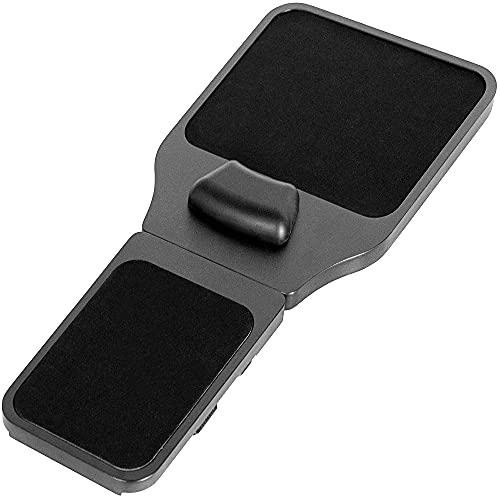
Pros
- Comfortable memory foam wrist pad reduces pressure points during long work sessions.
- Easy to install and remove with Velcro straps, no tools required.
- Adjustable platform length fits a wide range of chair arm sizes.
Cons
- May not fit chairs with very thick or irregularly shaped armrests.
- Wood surface may scratch if not handled carefully.
- Limited to use with chairs that have flat or slightly curved armrests.
The VIVO Wood Arm Rest Mouse Pad (MOUNT-MS02D) is a thoughtfully designed ergonomic accessory for anyone who spends long hours at a computer. This product functions as a chair-mounted platform that holds your mouse and supports your arm and wrist, aiming to reduce discomfort from repetitive mouse use. It is not a standalone piece of furniture but rather a smart add-on for existing office chairs, making it a great fit for home offices, small apartments, and dorm rooms where space is limited.
This mouse pad is best suited for home office workers, college students, remote professionals, and anyone looking to improve their workstation ergonomics without buying a new desk or chair. It is also useful for small-space dwellers who need to maximize every inch of their work area. The adjustable length (19 to 21.8 inches) and universal attachment system (Velcro straps) allow it to fit most standard chair arms, making it a versatile choice for various setups.
In terms of comfort, the memory foam wrist padding is a standout feature. It responds to your weight and provides a soft yet supportive surface that encourages a neutral wrist position. The wood platform is smooth and offers a stable base for mouse movement, which can help reduce strain during long work sessions. While it does not offer the plushness of a full armrest, it does provide a reliable, cushioned surface that many users will appreciate.
Build quality appears solid. The platform is made of wood with a clean black finish, and the Velcro straps feel secure. The memory foam pad is well-attached and should hold up over time. Assembly is straightforward: simply wrap the straps around your chair arm and tighten. No tools are needed, and the whole process takes just a couple of minutes. Cleaning is easy with a damp cloth, and the wood surface resists stains well.
One realistic limitation is that the straps may not fit chairs with very thick or oddly shaped armrests. The platform's size (19 x 11.8 inches) also means it may protrude slightly on narrower chairs. Additionally, while the wood surface is durable, it could scratch if you frequently place rough objects on it. These are minor concerns, but they are worth considering before purchase.
Overall, the VIVO Arm Rest Mouse Pad is a practical and affordable ergonomic solution for anyone who wants to improve their workstation comfort and organization. It works well in home offices, small apartments, and dorm rooms, and it is especially useful for users who frequently switch between left and right hand use. If you are looking to reduce wrist strain and keep your desk clutter-free, this product is a solid choice.

Pros
- Generous surface area fits both keyboard and mouse without clutter
- Multiple adjustment options (height, swivel, tilt) for personalized ergonomics
- Sturdy mount feels secure and stable once installed
- Smooth sliding mechanism with self-locking feature works well in daily use
- Aesthetically pleasing with a sleek black and green design that matches most setups
Cons
- Not compatible with plastic, stone, or glass desktops, limiting placement options
- Requires a desktop thickness of at least 0.71 inches, which may not fit all desks
- Installation can be slightly tricky if desk has tight clearance near legs or supports
The EUREKA ERGONOMIC Height Adjustable Under Desk Keyboard Tray is a versatile solution for anyone looking to reclaim desk space while improving their typing posture. Designed as a slide-out platform that mounts beneath your desk, this tray transforms a standard work surface into an ergonomic workstation. With its 28x10 inch size, it provides ample room for a full keyboard and mouse, or even a small laptop or tablet, making it a practical choice for home offices, gaming setups, and compact workspaces.
This tray is best suited for homeowners, apartment renters, home office users, college students, and anyone who spends long hours at a computer. For small-space dwellers, the under-desk design frees up valuable desktop area for other essentials. Gamers will appreciate the smooth gliding motion and adjustable tilt, which helps reduce wrist fatigue during extended play sessions. The built-in lip at the front doubles as a wrist rest and prevents the keyboard from sliding off when the tray is tilted, adding to everyday comfort.
Real-world performance hinges on the tray’s adjustability. You can raise or lower it, swivel it 360 degrees, and tilt it up to 43 degrees to find the most comfortable angle. The gravity self-locking feature keeps the tray firmly in place during use but allows you to slide it forward or backward smoothly when you lift it slightly. This mechanism feels sturdy and reliable, and the carbon fiber texture surface adds a touch of durability while being easy to wipe clean. According to the product specifications, the mount is built from solid materials and the overall structure feels stable once installed.
Build quality and practicality are strong points. The tray is designed to work with wood and MDF desktops that are at least 0.71 inches thick. It also fits desks with support beams, which is a nice bonus for older or custom-built furniture. The mounting bracket requires a desk depth of at least 17.8 inches, so measuring beforehand is important. Assembly is straightforward with the included hardware, though you may need a drill for some desk types. The tray itself weighs about 14 pounds, so it feels substantial but not overly heavy to mount.
One realistic limitation is the compatibility restriction—plastic, stone, or glass desktops are not supported. Also, if your desk has limited leg room or a shallow depth, the tray might not be suitable. The recommended desk dimensions are at least 20 inches deep, 39.5 inches long, and 29.1 inches high, so double-check your space before buying. Despite these constraints, for users with a compatible desk, this keyboard tray offers excellent value by improving ergonomics and clearing up your main work surface. It’s a practical investment for anyone working from home or gaming regularly.

Pros
- Ergonomic features including headrest, lumbar support, and adjustable armrests for personalized comfort
- Thick padding and metal frame provide durable support for long sitting sessions
- Versatile use for gaming, work, or study with reclining and swivel functions
- Affordable price point for a feature-rich gaming chair with footrest
Cons
- PU leather may not breathe as well as mesh, potentially causing warmth during extended use
- Assembly can take some time due to multiple components and instructions
- Compact size (22 x 22 x 47 inches) may not accommodate larger users comfortably
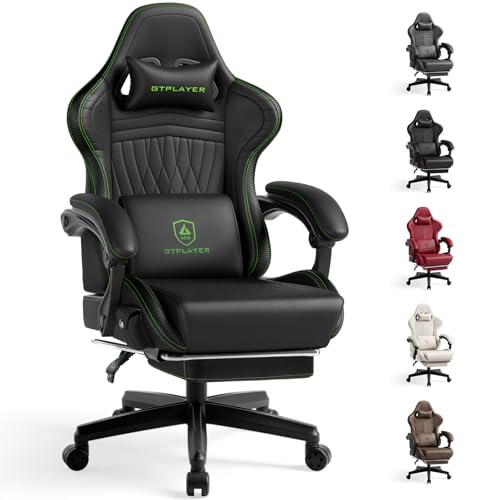
The GTPLAYER Gaming Chair with Footrest is a multifunctional seat designed for gamers, home office workers, and students who need comfort during long hours of sitting. This ergonomic computer desk chair features a reclining backrest, adjustable seat height, 3D armrests, and a built-in footrest, making it a practical addition to any home office, dorm room, or gaming setup.
Best suited for U.S. homeowners, apartment renters, college students, and small-space dwellers, this chair offers a compact footprint (22 x 22 x 47 inches) that fits easily into tight corners or shared rooms. Its deep blue color adds a pop of style, while the PU leather upholstery is easy to wipe clean after spills or daily use. The chair's 30-pound weight makes it manageable to move around, though assembly is required.
In terms of real-world performance, the thick padded seat cushion and metal frame provide reliable support for sitting up to several hours. The 3D armrests allow you to adjust height, angle, and rotation, which helps reduce strain on shoulders and wrists. The reclining feature lets you lean back for short breaks, and the footrest extends for added relaxation. However, the lumbar support is fixed, so users with specific lower back needs may want an additional cushion.
Build quality is decent for the price: the heavy-duty base and smooth nylon casters ensure stability and floor protection. The PU leather is described as durable enough to withstand sun and rain, but it may not be as breathable as fabric. The FSC-certified wood used in the cushion inner support is a nice eco-friendly detail. Assembly is straightforward with the included instructions, but expect to spend 30-45 minutes putting it together.
A realistic limitation is the chair's size: it's best for users up to around 5'10" or 200 lbs, as the seat width (22 inches) and depth are moderate. Taller or heavier individuals may find it snug. Additionally, the armrests are 3D but not height-adjustable in the traditional sense; they pivot and rotate but don't lift up and down independently.
Overall, the GTPLAYER Gaming Chair with Footrest is a solid choice for budget-conscious buyers who want ergonomic features and a footrest without breaking the bank. It works well for home offices, student apartments, or as a secondary gaming chair. For those prioritizing breathability or larger dimensions, consider alternatives, but for value and versatility, this chair delivers practical comfort.
The GTPLAYER Gaming Chair prioritizes comfort with its thick padded seat cushion and supportive metal frame. The 3D armrests let you adjust positioning to reduce wrist and shoulder fatigue, while the reclining backrest and footrest allow you to stretch out during breaks. The headrest and lumbar support are fixed but provide decent alignment for most users. Note that the PU leather may feel warm in hot climates, but it's easy to clean and maintain.
This chair features a heavy-duty base, smooth nylon casters, and a metal frame that supports the thick seat cushion. The PU leather is rated for sun and rain resistance, adding durability for varied environments. The FSC-certified wood in the cushion inner support reflects attention to sustainable materials. Assembly is required, but the included hardware and instructions make the process manageable. The chair's 30-pound weight feels solid without being overly heavy.
Assembly of the GTPLAYER Gaming Chair involves attaching the base, seat, backrest, armrests, and footrest. A detailed instruction manual and all necessary tools are included. Most users can complete the setup in 30-45 minutes. The process is straightforward, but having a second person can help when aligning the backrest and seat. No special skills are required, and the warranty covers replacement parts if anything is missing.

Pros
- Frees up desk space and reduces clutter in small home offices or apartments
- Highly adjustable arm allows you to position the keyboard exactly where it feels most comfortable
- Durable steel construction and cable management add long-term reliability and neatness
- Versatile mounting options (wall or pole) suit various work environments
Cons
- Requires drilling into wall or mounting on a compatible pole, which may not be ideal for renters
- Platform size may be snug for larger keyboards or those with built-in rests
- Some users might prefer a fixed tray over an articulated arm for stability in sim racing
The Mount-It! Keyboard Wall Mount with Pole Option is a versatile space-saving solution designed to declutter your desk and improve your ergonomic setup. This adjustable keyboard and mouse tray can be mounted on a wall or a pole, making it a flexible addition to home offices, medical stations, distribution centers, and even sim racing rigs. It attaches to a sturdy steel arm that extends up to 21.8 inches, tilts up to 85 degrees, and swivels 90 degrees, allowing you to position your keyboard exactly where you need it.
For U.S. homeowners and apartment renters who struggle with limited desk space, this mount is an excellent way to free up valuable real estate. By moving the keyboard and mouse off the desk surface, you can keep your workspace tidy and organized. The spacious platform comfortably holds a full-size keyboard and a mouse, and if you ever want to repurpose the arm, it can convert to a VESA monitor mount for screens up to 32 inches (75x75 or 100x100 pattern).
Ergonomics are a strong suit here. The spring-assisted arm lets you pull the keyboard close for intense work sessions or push it away when not in use. The tilt and swivel adjustments help reduce wrist strain by letting you angle the keyboard to a neutral position. This is particularly valuable for home office users who spend long hours typing or for sim racers who need their keyboard within easy reach.
Build quality is solid: the steel construction supports up to 15.4 pounds, and integrated cable management keeps cords organized. Installation is straightforward with included wall and pole mounting hardware and step-by-step instructions. However, mounting does require drilling into a wall or attaching to a suitable pole, which may be a limitation for renters or those who cannot alter their space. The platform itself is black and compact, fitting well in modern, minimalist, or tech-heavy decor.
A realistic limitation is that the platform may feel snug for oversized gaming keyboards or those with wide wrist rests. Also, while the articulated arm offers flexibility, some users in sim racing setups might prefer a fixed tray for more stability during intense driving. Overall, this mount is a practical and durable choice for anyone looking to improve ergonomics and reclaim desk space. It's especially suited for home office workers, medical professionals, and gamers who value flexibility and organization.
In short, the Mount-It! Keyboard Wall Mount is a well-built, adjustable solution that delivers on its promise of saving space and providing ergonomic comfort. If you're a homeowner or renter with a cluttered desk, a home office user needing better posture, or a sim racer wanting tidy rig setup, this tray is worth considering. Its lifetime warranty and US-based support add extra confidence.

Pros
- Large work surface compared to standard TV trays
- Full adjustability in height, depth, and rotation for personalized comfort
- Sturdy build with a 20-pound weight capacity and stable base
- Fits most couches, recliners, and office chairs without wobbling
- Attractive design that doesn't look like a typical tray table
Cons
- Not intended for freestanding use – must be paired with a chair or sofa
- Requires measuring chair depth before purchase to ensure proper fit (output range 20-32 inches)
- At 20 pounds, it's heavier than basic tray tables, which may reduce portability for some users
The Stander Wonder Tray is a thoughtfully designed adjustable swivel table that doubles as a large laptop stand, couch desk, and TV tray. Unlike basic lap desks or foldable trays, this piece is built to mount securely onto most chairs, recliners, and sofas, providing a stable surface for eating, working, gaming, or crafting. Its oversized 20x15 inch tray accommodates a full meal setup or a 15-inch laptop with room to spare, and the 360-degree swivel lets you angle the table perfectly without shifting your seat.
This product is especially suited for U.S. homeowners, apartment renters, small-space dwellers, remote workers, gamers, seniors, and college students. If you live in a compact apartment or dorm, the Wonder Tray eliminates the need for bulky side tables or desks. For home office users, it offers a portable workstation that can be moved from the living room couch to a recliner. Airbnb hosts will appreciate its flexibility – it can serve as a dining surface for guests or a laptop stand for business travelers, without taking up permanent floor space.
In terms of real-world performance, the tray delivers solid stability when properly attached to an armchair or sofa. The padded clamp and curved arm grip the armrest securely, and the metal base provides a broad, non-slip foundation. The height adjusts from 20 to 30 inches, and the depth from 20 to 32 inches, so you can dial in the perfect position for your specific seating. The surface is smooth and easy to clean – a quick wipe after meals or coffee is all it needs. The 20-pound weight capacity is generous for a laptop, plate, drink, and even a small monitor.
Build quality is a highlight. The base is a sturdy metal frame with a powder-coated finish that resists scratches and chips, while the tray itself is made from a wood-look laminate that mimics walnut grain. The swivel mechanism operates smoothly without wobbling, and the adjustment knobs tighten firmly. Assembly is tool-free and straightforward – the process involves sliding the tray onto the arm bracket and tightening a few hand screws. Most users can have it ready in under 10 minutes.
One realistic limitation is that the Wonder Tray is not designed for freestanding use; it must be mounted on a chair, sofa, or recliner. Also, because it relies on armrest depth, you need to measure your furniture's armrest depth (the horizontal distance from the back edge to the front of the arm) to ensure it falls within the 20-32 inch range. Models with very thin armrests may not fit securely. At 20 pounds, it's heavier than typical wooden TV trays, which might be a concern if you plan to move it frequently between rooms.
Overall, the Stander Wonder Tray is a practical investment for anyone who wants a dedicated, adjustable surface for eating or working from a comfortable chair. It works well in living rooms, home offices, dens, and even bedrooms. If you often find yourself balancing a plate on your lap or hunching over a laptop on the couch, this tray offers a stable, comfortable solution. The combination of generous size, full adjustability, and sturdy construction makes it a worthwhile addition to any home that values flexibility and space-saving design.

Pros
- Frees up desk space for documents, monitors, or personal items
- Easy to install on most height-adjustable office chairs with a compatible center pole
- Adjustable tilt and full rotation let you find the perfect typing angle
- Large tray accommodates even oversized keyboards and mouse pads
- Solid steel arm construction feels sturdy and supports long-term use
Cons
- Not compatible with some premium chairs like Herman Miller Aeron or Embody
- Adds extra weight to the chair, which may affect rolling mobility on carpets
- Installation requires your chair's pneumatic spring to be at least 2.75 inches tall, limiting compatibility
The VIVO Office Chair Mounted Keyboard and Mouse Tray (MOUNT-KB18CP) is a practical furniture accessory designed for those who want to reclaim desk space without sacrificing ergonomics. Instead of attaching to a desk or wall, this tray mounts directly to the center pole of a standard height-adjustable office chair, providing a stable platform for your keyboard and mouse right at your fingertips.
This product is best suited for U.S. homeowners, apartment renters, small-space dwellers, home office users, and even college students or Airbnb hosts who need a flexible workspace. Gamers with large monitor setups will also appreciate having their keyboard off the desk, allowing more room for mouse movement and screen placement. The tray’s 26 x 12 inch surface comfortably fits full-size keyboards and standard mice, and the included wrist pad adds a touch of comfort during long sessions.
Performance hinges on the chair’s compatibility. The tray attaches to the bottom tube section with a diameter between 1.7 and 2 inches, and the pneumatic spring must be at least 2.75 inches tall. Once mounted, the tray offers a tilting surface and full 360-degree rotation, letting you find the ideal typing angle. Height can be adjusted along the top section of the pole by about 5.8 inches, so you can position it just below your seated arm height. The steel arm support feels sturdy, and the clamping mechanism holds securely without wobbling during normal use.
Build quality is typical of VIVO’s accessories: a black powder-coated steel arm and a large plastic tray with a textured surface. The wrist pad is removable and adds a soft resting area. Assembly is straightforward, though you may need to remove any existing seat cushion or cover to access the pole. The instructions are clear, and most users can set it up in under 20 minutes. No drilling or permanent modifications to your desk or chair are required.
One realistic limitation is chair compatibility. Many high-end ergonomic chairs like the Herman Miller Aeron or Embody are not compatible due to their pole design or lack of a typical center tube. The tray also adds weight to the chair, which might make it slightly harder to roll on carpet. Additionally, if your chair has a very thick or thin pole, the clamp might not fit. Always check your chair’s specifications before purchasing.
Overall, this keyboard tray is a smart space-saving solution for anyone who works from home, games, or simply wants a cleaner desk. It shines in small apartments, dorm rooms, or any setup where desk real estate is at a premium. If your chair meets the compatibility requirements, this VIVO tray offers solid ergonomic benefits and everyday convenience for a reasonable price.
Ergonomics is the key benefit of this chair-mounted tray. The tilting surface lets you adjust the keyboard angle to keep your wrists straight, reducing strain during typing. The 360-degree rotation allows you to swing the tray out of the way when you stand up or need extra legroom. The height adjustment ensures the tray sits at the correct level relative to your elbows, promoting a neutral shoulder position. The included wrist pad provides a soft resting area, though it’s not a full gel pad.
For home office users or gamers spending hours at the computer, this tray can help maintain a healthier posture. By freeing up desk space, you can place your monitor at proper eye level and keep other items within reach. It’s especially useful for small desks where a traditional keyboard tray might not fit.
FAQs About Best Gaming Chair With Keyboard Tray in 2026
Will a chair-mounted keyboard tray fit my gaming chair?
It depends on the chair’s tube diameter. Most chair-mounted trays, like those from VIVO, require a bottom tube section between 1.7 and 2 inches. Measure your chair’s center pole before purchasing to ensure compatibility. Some models also work with round bars up to 1.96 inches diagonal thickness.
Are these trays durable enough for heavy keyboards and laptops?
Yes, many options are built with steel arms and sturdy platforms. For example, the Noble Createaprototype tray supports up to 20 kg, while VIVO’s steel arm handles daily use. Check the load capacity in the product description to match your gear.
Can I use a keyboard tray with a recliner or couch?
Absolutely. The Stander Wonder Tray is designed for couches, recliners, and lift chairs, with an adjustable curved arm that wraps around the armrest. It’s not for freestanding use, but it works well with most seated furniture.
Do these trays offer left-handed or right-handed support?
Many models accommodate both. VIVO’s MOUNT-KB08C and the Noble Createaprototype tray feature full 360-degree rotation and adjustable tilt, making them suitable for left- or right-handed users. The YuPinDiZu armrest pad also works on either side.
How easy is it to install a chair-mounted keyboard tray?
Installation is generally straightforward. Most attach with straps or clamps around the chair’s tube or armrest, requiring no drilling. The VIVO tray, for instance, uses a steel arm that clamps onto the bottom tube, and the YuPinDiZu pad uses Velcro straps and zip ties. Expect setup in under 10 minutes.
Will a keyboard tray help with wrist pain during long gaming sessions?
Yes. By bringing the keyboard and mouse closer, these trays reduce forward reach and allow a more natural wrist angle. Many include wrist padding or memory foam cushions. Combined with adjustable tilt, they can ease strain on shoulders and wrists over time.
What’s the difference between a chair-mounted tray and an under-desk tray?
A chair-mounted tray moves with you, keeping the keyboard close as you recline or shift. Under-desk trays stay fixed to the desk. Chair-mounted options save desk space and are ideal for tight setups or multipurpose rooms. For a traditional option, consider the EUREKA ERGONOMIC under-desk tray with slide-out design.