


Your gaming chair should be set at a height where your feet rest completely flat on the floor, your thighs sit parallel to the ground, and your knees bend at a clean 90-degree angle. Matching your seat elevation to your setup ensures your forearms rest level with the desktop or keyboard tray without shrugging your shoulders. Deciding how high should your chair be for gaming depends heavily on your leg length and workstation dimensions, but the core objective is maintaining an uncompromised neutral sitting posture. When your chair is adjusted properly, lower body weight distributes evenly across the seat cushion rather than concentrating on the underside of your thighs or your tailbone.
Most standard gaming seats, such as the Homall Gaming Chair, Office Chair High Back, feature a pneumatic lift with an adjustment span between 17.3 to 21.5 inches to accommodate typical 28-to-30-inch computer desks. If your seat sits too high, your feet dangle and blood circulation gets pinched under the hamstrings. If it sits too low, your knees hike up above your hips, transferring excessive stress straight into the lower lumbar curve. Pairing this vertical setting with a proper gaming chair armrest setup stabilizes your upper body, keeping your wrists neutral during prolonged gaming or editing sessions.

Pros
- Comfortable high-density foam cushioning with lumbar support and headrest.
- Sturdy steel frame and 300 lb weight capacity ensure long-term durability.
- Smooth-rolling rubber casters protect floors and move quietly.
- Easy to assemble with clear instructions and included tools.
- Affordable price point for a feature-rich ergonomic chair.
Cons
- PU leather may feel warm in hot climates or during extended use.
- Armrests are fixed and not adjustable, which may limit comfort for some users.
- Seat depth may be too shallow for taller individuals.
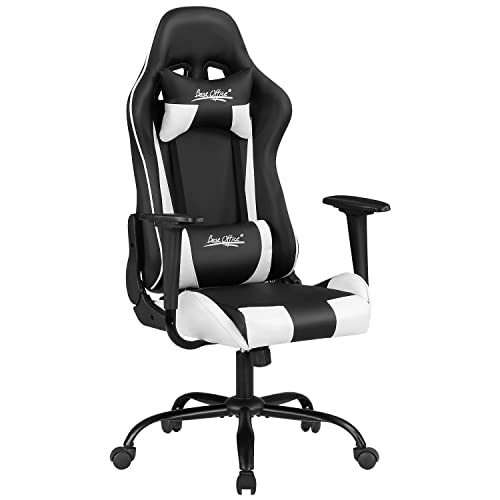
The Homall Gaming Chair is a high-back computer desk chair that blends racing-inspired aesthetics with practical ergonomic features. Designed for both gaming and office use, this chair offers a comfortable seating solution for U.S. homeowners, apartment renters, college students, and home office users who value style and support without breaking the bank.
In terms of comfort, the chair features high-density shaping foam that provides a firm yet supportive seat, helping to reduce pressure during long hours of sitting. The included headrest and lumbar support pillows add extra cushioning for the neck and lower back, which many users may find beneficial for maintaining good posture. The chair's recline function allows you to lean back between 90 and 155 degrees, and the rocking feature lets you gently sway, making it easy to shift between focused work and relaxed breaks.
Build quality is a strong point here. The 1.8mm thick steel frame offers solid stability, and the Class 3 gas lift supports up to 300 pounds reliably. The PU leather upholstery feels smooth and is simple to wipe clean, which is a plus for busy households or dorm rooms. Rubber casters roll quietly on hard floors and carpets, and they've been tested for durability over long distances, according to the manufacturer.
Assembly is straightforward, with most users reporting it takes about 20-30 minutes using the included tools and instructions. The chair's compact footprint (19.8 x 20.5 inches) makes it a good fit for small spaces like apartment desks or compact home offices. Its white color adds a modern, clean look that can brighten up a room and coordinate with various decor styles.
However, there are a few realistic limitations. The PU leather can become warm during extended use, especially in warmer climates or without air conditioning. The armrests are fixed and not adjustable, which may be a drawback for users who need customizable arm support. Additionally, the seat depth might feel shallow for taller individuals, potentially reducing thigh support.
Overall, the Homall Gaming Chair offers excellent value for its price, combining comfort, durability, and style in a package that suits a wide range of users. Whether you're setting up a home office, furnishing a dorm room, or upgrading your gaming station, this chair provides practical ergonomic support and a sleek appearance that fits modern living spaces.
The Homall Gaming Chair prioritizes comfort with its high-density shaping foam that contours to your body while maintaining resilience over time. The included headrest and lumbar support pillows target key pressure points, helping to reduce strain during long work or gaming sessions. The chair's recline range from 90 to 155 degrees allows you to find your ideal sitting or lounging angle, and the rocking function adds a gentle motion that many users find relaxing. While the foam is firm, it provides good support for extended use, though some may prefer a softer cushion.
This chair is built with a 1.8mm thick steel frame that provides a sturdy foundation, capable of supporting up to 300 pounds. The Class 3 gas lift ensures smooth height adjustment and reliable performance. Rubber casters are designed for quiet rolling and have been tested for durability over long distances. The PU leather upholstery is skin-friendly and resistant to wear, making it easy to clean with a damp cloth. Overall, the materials and construction suggest a chair that can withstand daily use in a home or office environment.
Assembly of the Homall Gaming Chair is relatively simple and can be completed in about 20-30 minutes. The package includes all necessary tools and a clear instruction manual. Most steps involve attaching the base, gas lift, seat, backrest, and armrests using provided screws. Users generally find the process straightforward, though having a second person can make aligning the backrest easier. No specialized skills are required, making it accessible for most buyers.
The white finish of this Homall gaming chair gives it a clean, modern look that can brighten up any room. Its racing-inspired design adds a sporty touch, while the overall silhouette remains sleek and professional enough for an office setting. The chair pairs well with contemporary, minimalist, or even eclectic decor styles. Its compact size makes it easy to fit into smaller spaces without overwhelming the room, and the neutral color allows it to blend with various color schemes.

Pros
- Generous padding and footrest provide excellent relaxation support
- Lumbar curve promotes healthy sitting habits during extended use
- Sturdy metal frame and SGS-certified gas lift ensure long-term stability
- Easy to assemble with clearly labeled parts and simple instructions
Cons
- Firm cushion may feel too stiff for some users right out of the box
- PU leather can trap heat in warmer rooms or during summer months
- Large footprint (27.2 inches wide) may not fit well in very compact spaces
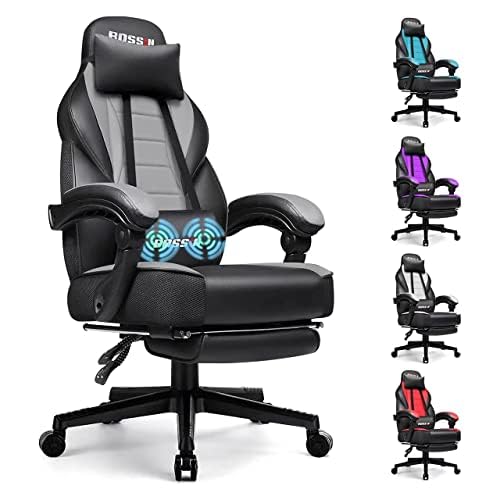
The BOSSIN Gaming Chair with Massage and Footrest is a versatile seating option designed for gamers, home office workers, and even kids who spend hours at a desk. It combines ergonomic support with a built-in footrest and massage function, making it a practical choice for anyone seeking all-day comfort without breaking the bank.
This chair targets a wide audience including U.S. homeowners setting up a game room, apartment renters needing a compact yet supportive office chair, families looking for a shared desk solution, and college students tackling long study sessions. Its big-and-tall frame also accommodates larger body types, while the racing style appeals to younger users and interior decor shoppers wanting a modern aesthetic.
In real-world use, the ergonomic lumbar curve closely follows the spine to encourage better posture, reducing lower back fatigue during marathons of work or play. The retractable footrest lets you kick back for quick breaks, and the massage function adds gentle vibration to soothe tired muscles. The cushioning is thick but firm, providing stable support without bottoming out over time. The PU leather upholstery feels smooth and resists spills, making cleanup as simple as a wipe with a damp cloth.
Build quality is solid thanks to a reinforced metal frame and an SGS-certified Class 4 gas lift that handles repeated height adjustments. The armrests are padded from elbow to wrist, and the foam under the leather remains resilient even after months of leaning. Assembly is straightforward: all screws and small parts are packaged in labeled bags, and the instructions are easy to follow, so you can have the chair ready in about 20 to 30 minutes.
Realistically, the cushion is on the firmer side, which some users may need time to break in. The PU leather can feel warm in non-air-conditioned rooms, and the chair's 27.2-inch width may be tight for very small desks or narrow corners. Additionally, while the massage function is a nice extra, it's a basic vibration feature rather than a deep tissue option.
Overall, the BOSSIN Gaming Chair offers excellent value for its price point. It works well in living rooms as a dedicated gaming spot, in home offices for daily work, or in teen bedrooms for homework and play. If you need a sturdy, feature-rich chair that's easy to clean and simple to assemble, this is a reliable pick that balances comfort and practicality for everyday use.


Setup and Height Adjustment Questions
How do I know if my gaming chair is adjusted too low?
Your gaming chair is too low if your knees sit noticeably higher than your hips when your feet rest flat on the floor. This sharp angle places excess pressure on your pelvic region and forces your lower back into a slouch. You will also notice your elbows dropping below the desk level, forcing you to reach upward and strain your shoulder muscles. Raising the gas cylinder until your thighs rest level with the floor restores a balanced posture.
What should I do if my feet cannot touch the floor at desk height?
You should use an ergonomic footrest rather than lowering your chair below the desk surface. Lowering your seat to touch the floor when a desk cannot adjust downward forces your wrists to bend awkwardly against the sharp desk edge. Adding an under-desk footrest allows your feet to maintain solid support while your seat height aligns your elbows flush with your keyboard. Chairs with deep seats or built-in leg supports, like a Bossin gaming chair black setup with an extendable footrest, help support your lower limbs during relaxed breaks.
How should armrest height be adjusted relative to a gaming desk?
Armrests should be positioned so your forearms rest naturally at a 90-to-100-degree angle, level with the top of your mouse pad. If the armrests sit too high, your shoulders will push upward into a perpetual shrug, causing upper back fatigue over extended sessions. When armrests are too low, your arms hang unsupported and pull on your neck muscles. Chairs equipped with flip-up arms or linkage mechanisms can provide clearance if you prefer sliding closer to the desk edge.
Does cushion thickness change how high should your chair be for gaming?
Yes, cushion materials directly alter your effective seated height once your body compresses the seat base. Thick pocket-spring cushions, found in models like the N-GEN GAMING Big & Tall Gaming Chair, Footrest and HLDIRECT High Back Gaming Chair, compress less than standard open-cell foam, keeping your seated position slightly higher off the cylinder. Always adjust your seat height while actively sitting in the chair with full body weight applied rather than gauging the empty chair height.
How does monitor height factor into chair height adjustments in 2026?
Monitor position should be adjusted only after your seat height is correctly set to your floor and desk. You should never raise or lower your chair simply to align your eyes with your screen, as this compromises your leg and arm posture. Once your seat height creates a 90-degree bend at your knees and elbows, adjust your monitor stand or monitor arm so the top third of the display sits at eye level. This prevents chronic neck craning and forward head tilt.
Can a chair height mismatch cause back discomfort during long sessions?
Yes, sitting at an incorrect seat height can significantly increase tension across the lumbar spine and hip joints. Setting the chair too high compresses the back of the thighs and pulls the pelvis forward, while setting it too low arches the spine into a slouch. Utilizing proper vertical adjustments alongside reliable home office chairs for back support ensures your spine maintains its natural alignment during long work and play sessions.




Write Your Review
No reviews yet. Be the first to share your experience!