


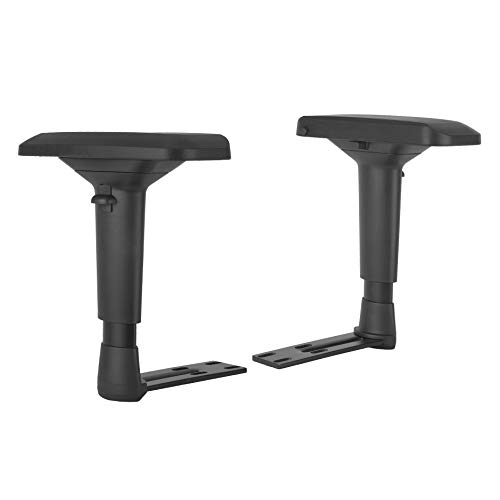
Long desk sessions often end with aching forearms and stiff shoulders if your elbow support can’t keep up with your seating angle. A synchronized linkage gaming chair armrest solves this posture issue by gliding in tandem with the backrest as you tilt back between 90 and 135 degrees. That movement keeps your elbows supported without forcing awkward manual adjustments every time you kick back. Buyers exploring these designs will notice options split between complete reclining seats with integrated rests and standalone replacement brackets meant to repair worn hardware. Reviewing practical Bossin gaming chair armrest setup guidelines highlights how crucial pivot strength and mounting plate spacing are for daily durability.
Evaluating your battlestation helps determine whether you need a full chair overhaul or a quick replacement part. Complete packages from brands like GTPLAYER pair dynamic linkage arms with pocket spring cushions and retractable footrests for extended gaming sessions. In contrast, standalone armrest accessories rely on universal four-hole or five-hole brackets to revive existing frames without buying a new seat. While linkage designs don’t provide the independent height adjustments found on 4D arms, they deliver effortless forearm support during relaxed controller play. Comparing these setups against popular adjustable gaming chairs ensures you pick the right balance between synchronized recline and rigid desk alignment.


Pros
- Excellent cushion comfort from pocket springs and foam - feels like a sofa
- Breathable fabric keeps you dry even during long gaming or work sessions
- Interlocking armrests move with you, reducing strain when reclining
- Footrest adds relaxation value without taking extra floor space
- Easy to assemble with clear instructions and included tools
Cons
- Armrests lack independent height or angle adjustment - interlocking only limits customization
- Footrest may feel short for taller users (roughly under 5'10'')
- No reviews yet, so real-world feedback is limited - rely on specs and brand reputation
The GTPLAYER Gaming Chair sits at the intersection of work and play, offering a practical seating solution for both your home office and gaming setup. Designed with a pocket spring cushion and high-elastic polyurethane foam, this chair aims to deliver a sofa-like sitting experience that supports you through long workdays or extended gaming sessions.
This chair is best suited for U.S. homeowners, apartment renters, remote workers, college students, and small-space dwellers who need a single chair that pulls double duty. The compact footprint - 21.5 x 20 inches - fits neatly into smaller rooms, dorm corners, or shared home offices. The simple black finish and understated embroidery make it easy to pair with modern, minimalist, or even farmhouse decor.
Comfort is the highlight here. The independent pocket springs in the seat cushion adapt to your shape, while the one-piece molded polyurethane core provides consistent support without glue or formaldehyde concerns. The self-developed fabric with quilting increases breathability, helping you stay cool and comfortable even in warmer months. The high back with lumbar support promotes good posture, and the interlocking armrests adjust automatically as you recline, so your elbows stay supported without fiddling with levers.
Build quality appears solid for the price point. The FSC-certified wood inner support adds durability and environmental peace of mind. The chair uses a 10 cm safety air pressure bar with step-free recline. While the base and casters are not detailed in the description, the overall weight of about 22 pounds suggests a sturdy yet manageable frame. Assembly is straightforward with the included manual and hardware, and most users can get it set up in under 30 minutes.
One realistic limitation is the armrest design. They interlock with the backrest recline but do not offer independent height, width, or pivot adjustments, which some users may miss for precise ergonomic positioning. The footrest is a nice bonus for quick breaks, but taller individuals (over 5'10'') might find it a bit short for full leg extension. Since the product has no reviews yet, it's worth noting the brand's 30-day replacement and one-year warranty provides peace of mind.
For anyone needing an affordable multi-purpose chair that works for both office tasks and relaxing, the GTPLAYER is a practical buy. It's especially valuable for remote workers, students, and apartment dwellers who want chair that doesn't sacrifice comfort for space. While it won't replace a premium ergonomic chair with full adjustments, its pocket spring cushion and breathable fabric make it a strong contender in the under-$150 segment.
The pocket spring cushion is the stand-out comfort feature. Each spring works independently to contour to your body, reducing pressure points. Combined with the thick polyurethane foam, the seat feels plush yet supportive - similar to a good sofa. The breathable quilted fabric prevents heat buildup, so you don't get sweaty after hours of use. The high back with built-in lumbar support encourages good posture, and the footrest adds a welcome option for stretching.
The chair uses a one-piece molded polyurethane core for the seat, ensuring consistent density without glue. The inner support is FSC-certified wood, adding durability and an eco-friendly touch. The fabric is a self-developed quilting material that remains soft after repeated use. The 10 cm safety air pressure bar offers smooth height adjustment and step-free recline. While the base and casters aren't specified, the overall construction feels sturdy for the price. The 22-pound weight indicates a solid frame that can handle daily use.

Pros
- Memory foam provides noticeable pressure relief and comfort for long sitting sessions
- Stretch-fit design accommodates a range of armrest sizes and is simple to install
- Machine-washable covers make maintenance easy and keep pads looking fresh
- Non-slip backing helps keep the pads securely in place while you work or play
Cons
- Velvet polyester finish may not be ideal for those with skin sensitivities or who prefer a different fabric texture
- Only fits armrests within the listed dimensions; larger or smaller armrests may require a different size
- May add slight thickness to the armrest, which could affect how you position your elbows at the desk
If you've ever spent a full workday with your elbows resting on hard plastic or thin fabric armrests, you know the discomfort that can build up over time. The Aloudy Ergonomic Memory Foam Office Chair Armrest Pads are designed to solve that exact problem. These stretch-fit covers add a plush layer of memory foam cushioning to your existing chair arms, turning an often-overlooked source of pressure into a comfortable resting spot.
These armrest pads are a great fit for U.S. homeowners, apartment renters, home office workers, college students, or anyone who spends hours at a desk. They work well with office chairs, gaming chairs, and even some dining or living room seating where armrests could use extra padding. The pads measure 9.5 inches long by 4.5 inches wide by 1.5 inches thick, so they suit most standard armrests between 6 and 10.5 inches. The stretch-fit design makes installation easy - just pull the cover over the armrest and adjust the memory foam pad into position. No tools or assembly required.
In terms of real-world performance, the memory foam provides a soft yet supportive feel that helps relieve pressure on your elbows and forearms. The velvet polyester fabric is smooth to the touch and breathable, so your arms won't get sweaty even during long sessions. Users will appreciate the hidden zipper that lets you remove the cover for machine washing - a handy feature for keeping the pads clean over time. The non-slip backing also helps the pads stay put while you move around at your desk.
Build quality is solid for the price point. The memory foam holds its shape well, and the fabric cover is sewn with durable stitching. The pads add about 1.5 inches of height to the armrest, which may slightly change your elbow angle, but most users will adjust quickly. The black color is neutral and blends easily with most chair designs, from sleek modern office chairs to more traditional gaming setups.
One realistic limitation is that the velvet-like texture might not appeal to everyone - those with sensitive skin or a preference for mesh or leather may want to check the material first. Also, if your armrests are significantly larger than 10.5 inches or smaller than 6 inches, these pads may not fit securely. The product description also mentions a longer version for wider arms, so be sure to measure before buying.
Overall, the Aloudy armrest pads are a practical and affordable comfort upgrade for anyone looking to reduce elbow and forearm pressure without replacing their entire chair. Whether you're equipping a home office, upgrading a dorm room chair, or adding comfort to a rental property desk setup, these pads deliver noticeable relief for a modest investment.




Frequently Asked Questions About Linkage Armrests
How does a linkage gaming chair armrest work during recline?
Linkage armrests attach to both the seat pan and the backrest with mechanical pivot joints. When you recline between 90 and 135 degrees, the arms automatically pivot backward to maintain steady contact with your elbows. This synchronized design eliminates manual adjustments and keeps forearms cushioned whether sitting upright or lounging.
Can you install a linkage armrest on any gaming chair?
No, linkage armrests require dedicated mounting points on both the seat cushion frame and the reclining backrest. Standard upright brackets, like those seen on a Neo adjustable gaming chair, attach solely beneath the seat base. Always inspect your chair frame for dual mounting holes before buying replacement linkage hardware.
How do linkage armrests compare to 4D adjustable armrests?
Linkage armrests move automatically with your backrest recline, while 4D armrests adjust independently across height, width, and angle. Independent 4D armrests suit upright competitive mouse-and-keyboard play where precise desk height matching is critical. Linkage units excel for console gaming and media viewing because they support forearms through deep recline angles.
How do you measure replacement linkage armrests for correct fit?
Measure the center distance between bolt holes on your existing seat and backrest brackets using a metric ruler. Most universal replacement linkage arms use either four-hole patterns with 1.57-inch (4 cm) widths or five-hole patterns with 1.97-inch (5 cm) widths. Matching these dimensions ensures the new brackets bolt on without modifying your chair frame.
How can you stop linkage armrests from wobbling or squeaking?
Tightening all pivot hinge screws and bracket bolts stops looseness that develops from repeated reclining. Because linkage arms articulate constantly, pivot hardware can experience minor loosening during routine desk use. Applying a small drop of non-corrosive silicone lubricant to pivot pins also quiets joint squeaks without degrading the plastic frame.
Will chairs with linkage armrests slide under standard desks?
Yes, chairs with linkage armrests generally fit under standard desks when the gas lift cylinder is adjusted downward. Because linkage arms don’t lower independently, you must adjust the chair seat height to clear 29-inch to 30-inch desk surfaces. Reviewing safer gaming chair adjustments ensures proper knee clearance while keeping arm pads safe from desk edge scrapes.


